STLBEAST workshop mode
3D Printer Layer Shift
Fix sudden sideways offsets, shifted layers, skipped motion, and prints that move out of alignment.
Start hereLayer shifts are motion failures. Inspect obstructions, belts, pulleys, rails, cables, and acceleration before changing extrusion settings.
First safe actionCheck for collisions and mechanical resistance before increasing belt tension.
Proof targetA small repeat print completes with aligned vertical walls.
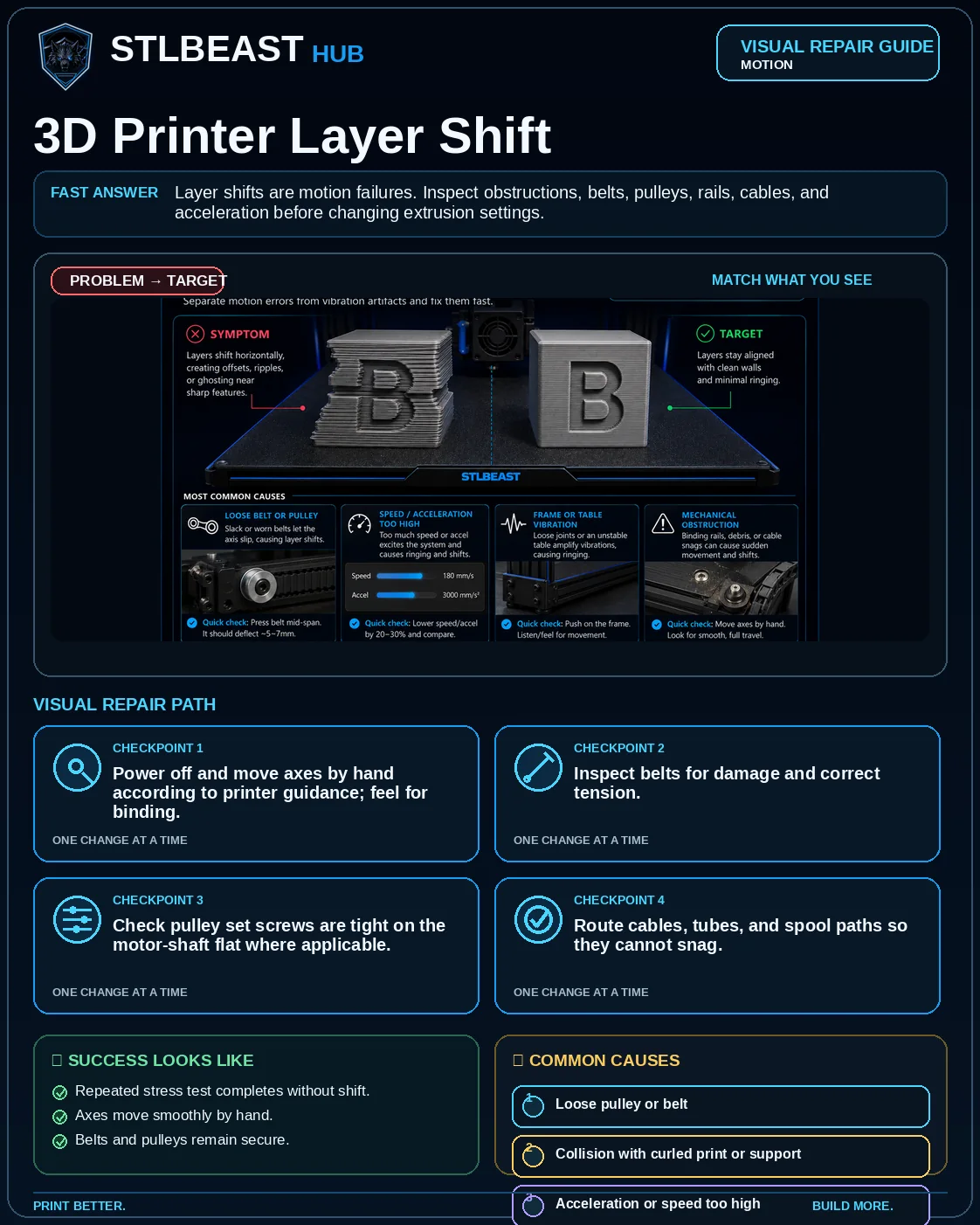 Match the failed area to the visual before changing a setting.
Repair progress0 of 7 complete
Keep the problem and target visual open while you make this change.
Why this mattersMotor turns but carriage movement is lost.
Setting or checkAccelerationUse tested printer limits rather than internet values for another machine.
Expected resultRepeated stress test completes without shift.
Keep the problem and target visual open while you make this change.
Why this mattersThe nozzle physically knocks the motion system off position.
Setting or checkTravel speedReduce if shifts happen during non-print moves.
Expected resultAxes move smoothly by hand.
Keep the problem and target visual open while you make this change.
Why this mattersMotor torque is insufficient for the commanded move.
Setting or checkZ hopCan avoid minor contact but should not hide warping or loose mechanics.
Expected resultBelts and pulleys remain secure.
Keep the problem and target visual open while you make this change.
Why this mattersMotion stalls temporarily.
Setting or checkAccelerationUse tested printer limits rather than internet values for another machine.
Expected resultNo collision marks appear on the model.
Keep the problem and target visual open while you make this change.
Why this mattersTorque drops during long prints.
Setting or checkTravel speedReduce if shifts happen during non-print moves.
Expected resultRepeated stress test completes without shift.
Keep the problem and target visual open while you make this change.
Why this mattersMotor turns but carriage movement is lost.
Setting or checkZ hopCan avoid minor contact but should not hide warping or loose mechanics.
Expected resultAxes move smoothly by hand.
Step 7 of 7
Check cooling, driver/motor temperatures, and electrical connections if shifts happen after time.
Keep the problem and target visual open while you make this change.
Why this mattersThe nozzle physically knocks the motion system off position.
Setting or checkAccelerationUse tested printer limits rather than internet values for another machine.
Expected resultBelts and pulleys remain secure.
Controlled test logChange one variable, then record what happened
This keeps temperature, retraction, speed, mechanical, and material tests from blending together. The history stays private in this browser.
Open proof report →No controlled tests logged yet. Record the first change before adjusting a second variable.
Do not repeat the full print yet
Prove the repair with a small test
Test modelSmall representative test print
SetupUse the same printer, material, slicer and key settings as the failed model.
Pass conditionThe original symptom is absent and the target feature is repeatable.
If it still failsThe symptom remains in the same location or stage.
Complete the repair steps, run the proof test, and record the result.
Only if the proof test still failsNext strongest repair paths
Do not stack these changes. Open one related guide based on the evidence that remains.