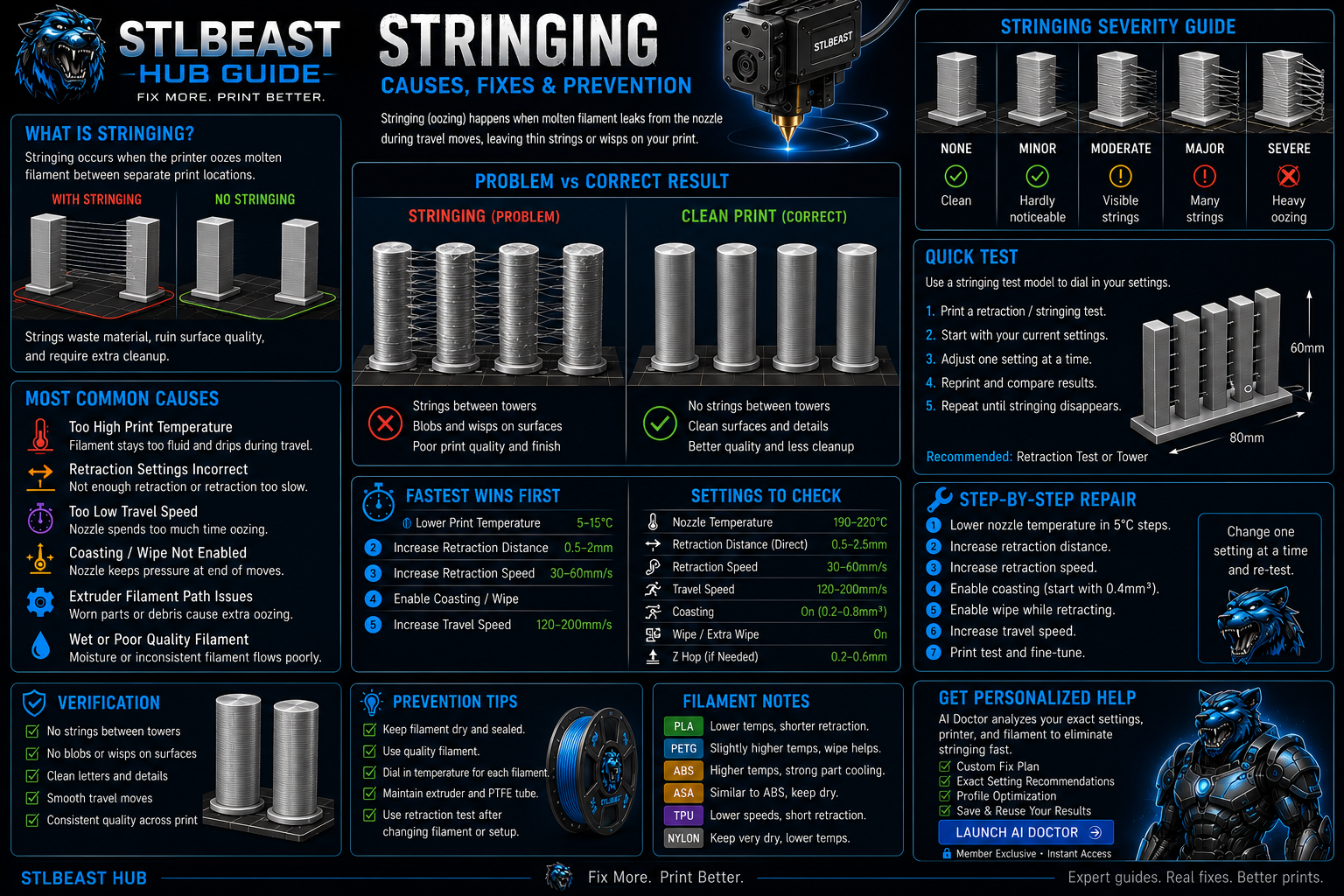
How to Fix Stringing in 3D Prints
Stop fine hairs, heavy webs, oozing, and travel strings by testing moisture, temperature, retraction, and travel behavior in the right order.
- Title matches “stringing”
- Keyword match
- Likely-cause match
Use normal language such as “hairy PETG print,” “clicking extruder and thin lines,” or “resin part stuck to the film.” The engine translates common descriptions into technical causes and explains why each answer matched.
Results are ranked by symptom, title, cause and equipment context.
Stop fine hairs, heavy webs, oozing, and travel strings by testing moisture, temperature, retraction, and travel behavior in the right order.
Reduce PETG webs, blobs, wisps, and nozzle buildup without making layers brittle or over-retracting the filament.
A detailed STLBEAST repair guide to tune distance and speed without creating heat creep or grinding. Learn how to recognize the symptom, rank the likely causes, apply safe fixes in order, verify the result, and prevent the failure from returning.
Tune flexible filament speed, feed path, retraction, temperature, and support behavior.
A detailed STLBEAST repair guide to choose the lowest temperature that gives clean flow and strong bonding. Learn how to recognize the symptom, rank the likely causes, apply safe fixes in order, verify the result, and prevent the failure from returning.
A detailed STLBEAST repair guide to remove texture caused by slicer settings or unstable extrusion. Learn how to recognize the symptom, rank the likely causes, apply safe fixes in order, verify the result, and prevent the failure from returning.
Identify moisture before changing slicer settings, then dry and store filament safely.
Tune PETG adhesion, stringing, temperature, cooling, flow, and supports for clean strong prints.
Build a reliable PLA baseline for temperature, cooling, speed, retraction, first layer, and strength.
A detailed STLBEAST repair guide to reduce contact during travel without masking extrusion faults. Learn how to recognize the symptom, rank the likely causes, apply safe fixes in order, verify the result, and prevent the failure from returning.
Fix first-layer squish, flow, seam blobs, clearance, support intrusion, and cooling, then verify with a small print-in-place calibration model.
A detailed STLBEAST repair guide to preserve shine while maintaining layer bonding and detail. Learn how to recognize the symptom, rank the likely causes, apply safe fixes in order, verify the result, and prevent the failure from returning.
Members can connect ranked answers to saved printers, previous failed repairs, full Printer Settings, AI Doctor case history and community-confirmed configurations.