

#1 answer84% match
Print Speed vs Quality Guide
Choose realistic speeds for walls, infill, overhangs, bridges, and volumetric flow.
Why this matched
- Title matches “vs”
- Symptom match
Slicer SettingsEasy14 min
Use normal language such as “hairy PETG print,” “clicking extruder and thin lines,” or “resin part stuck to the film.” The engine translates common descriptions into technical causes and explains why each answer matched.
Results are ranked by symptom, title, cause and equipment context.
Choose realistic speeds for walls, infill, overhangs, bridges, and volumetric flow.
A detailed STLBEAST repair guide to tune normal or tree supports using OrcaSlicer preview and interface controls. Learn how to recognize the symptom, rank the likely causes, apply safe fixes in order, verify the result, and prevent the failure from returning.
A detailed STLBEAST repair guide to configure support material, interfaces, and organic supports predictably. Learn how to recognize the symptom, rank the likely causes, apply safe fixes in order, verify the result, and prevent the failure from returning.
A detailed STLBEAST repair guide to choose the least intrusive adhesion aid that solves the geometry problem. Learn how to recognize the symptom, rank the likely causes, apply safe fixes in order, verify the result, and prevent the failure from returning.
A detailed STLBEAST repair guide to choose support geometry based on contact, stability, and cleanup. Learn how to recognize the symptom, rank the likely causes, apply safe fixes in order, verify the result, and prevent the failure from returning.
A detailed STLBEAST repair guide to remove fragments and prevent brittle feed failures. Learn how to recognize the symptom, rank the likely causes, apply safe fixes in order, verify the result, and prevent the failure from returning.
A detailed STLBEAST repair guide to save realistic flow values for each filament rather than one global value. Learn how to recognize the symptom, rank the likely causes, apply safe fixes in order, verify the result, and prevent the failure from returning.
A detailed STLBEAST repair guide to close visible gaps without crushing the first layer. Learn how to recognize the symptom, rank the likely causes, apply safe fixes in order, verify the result, and prevent the failure from returning.
A detailed STLBEAST repair guide to create reliable internal dimensions for functional parts. Learn how to recognize the symptom, rank the likely causes, apply safe fixes in order, verify the result, and prevent the failure from returning.
A detailed STLBEAST repair guide to find intermittent restrictions and feed variation. Learn how to recognize the symptom, rank the likely causes, apply safe fixes in order, verify the result, and prevent the failure from returning.
A detailed STLBEAST repair guide to reduce ringing after mechanical issues are corrected. Learn how to recognize the symptom, rank the likely causes, apply safe fixes in order, verify the result, and prevent the failure from returning.
A detailed STLBEAST repair guide to find exposure that preserves detail while maintaining strength. Learn how to recognize the symptom, rank the likely causes, apply safe fixes in order, verify the result, and prevent the failure from returning.
A detailed STLBEAST repair guide to keep viscosity and cure response within the resin maker range. Learn how to recognize the symptom, rank the likely causes, apply safe fixes in order, verify the result, and prevent the failure from returning.
A detailed STLBEAST repair guide to preserve shine while maintaining layer bonding and detail. Learn how to recognize the symptom, rank the likely causes, apply safe fixes in order, verify the result, and prevent the failure from returning.
A detailed STLBEAST repair guide to verify actual extrusion width using a controlled wall test. Learn how to recognize the symptom, rank the likely causes, apply safe fixes in order, verify the result, and prevent the failure from returning.
A detailed STLBEAST repair guide to use built-in calibration tools in a sensible order. Learn how to recognize the symptom, rank the likely causes, apply safe fixes in order, verify the result, and prevent the failure from returning.
Confirm the mesh was saved, the correct profile is loaded after homing, start G-code does not clear it, and the Z axis visibly compensates during the first laye.
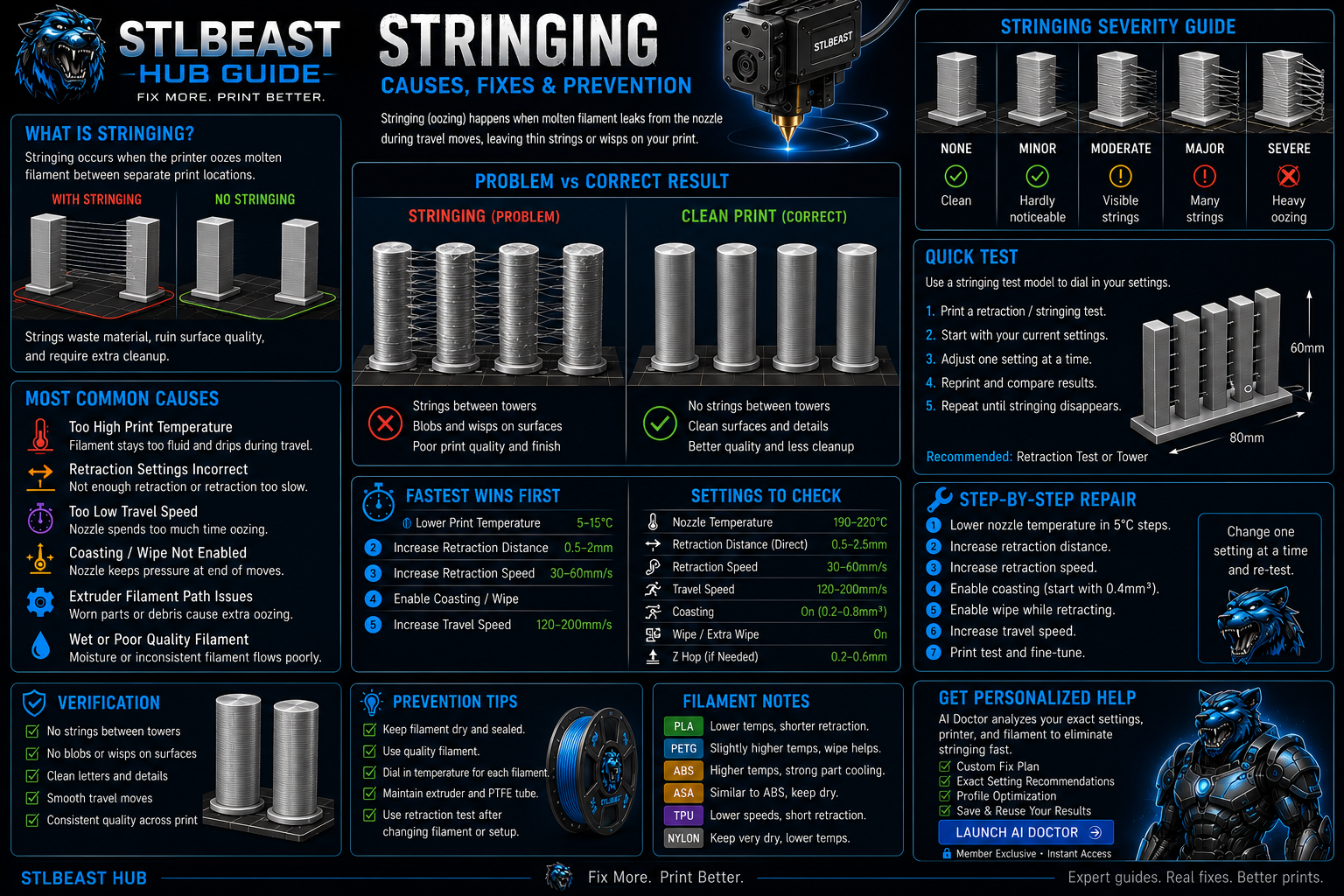
Stop fine hairs, heavy webs, oozing, and travel strings by testing moisture, temperature, retraction, and travel behavior in the right order.

Identify enlarged or damaged nozzle openings, soft detail, inconsistent line width, and abrasion damage.

Identify moisture before changing slicer settings, then dry and store filament safely.
A detailed STLBEAST repair guide to design and tune functional threads for the process. Learn how to recognize the symptom, rank the likely causes, apply safe fixes in order, verify the result, and prevent the failure from returning.

Fix swollen walls, rough top surfaces, seam blobs, and excess plastic without starving the print.

Reduce PETG webs, blobs, wisps, and nozzle buildup without making layers brittle or over-retracting the filament.

Build a reliable PLA baseline for temperature, cooling, speed, retraction, first layer, and strength.

Fix poor bed adhesion, lifting first layers, loose corners, and prints that detach from the build plate.
A detailed STLBEAST repair guide to calibrate volume only after Z offset and leveling are correct. Learn how to recognize the symptom, rank the likely causes, apply safe fixes in order, verify the result, and prevent the failure from returning.

Calibrate average extrusion without hiding clogs, incorrect Z offset, or hotend-capacity limits.

Identify an over-squished first layer, scraping nozzle, blocked extrusion, ridges, and elephant-foot symptoms.
Members can connect ranked answers to saved printers, previous failed repairs, full Printer Settings, AI Doctor case history and community-confirmed configurations.

Pair practical Hub guidance with Caffeine Monster and the clear three-product Character Collectibles Starter Pack.