TPU Flexible Filament Settings Guide
Tune flexible filament speed, feed path, retraction, temperature, and support behavior.
- Title matches “tpu”
- Keyword match
- Direct-answer match
Use normal language such as “hairy PETG print,” “clicking extruder and thin lines,” or “resin part stuck to the film.” The engine translates common descriptions into technical causes and explains why each answer matched.
Results are ranked by symptom, title, cause and equipment context.
Tune flexible filament speed, feed path, retraction, temperature, and support behavior.
A detailed STLBEAST repair guide to keep TPU/TPE constrained from drive gear to hotend. Learn how to recognize the symptom, rank the likely causes, apply safe fixes in order, verify the result, and prevent the failure from returning.
A detailed STLBEAST repair guide to stabilize heater control before tuning print quality. Learn how to recognize the symptom, rank the likely causes, apply safe fixes in order, verify the result, and prevent the failure from returning.
Verify the heater cartridge, thermistor reading, connectors, power supply, hotend assembly, and fan airflow before changing slicer temperatures.
A detailed STLBEAST repair guide to stop molten plastic leaking above the nozzle. Learn how to recognize the symptom, rank the likely causes, apply safe fixes in order, verify the result, and prevent the failure from returning.
A detailed STLBEAST repair guide to restore a clear and aligned filament path. Learn how to recognize the symptom, rank the likely causes, apply safe fixes in order, verify the result, and prevent the failure from returning.
A detailed STLBEAST repair guide to remove the obstruction without damaging fittings or the hotend. Learn how to recognize the symptom, rank the likely causes, apply safe fixes in order, verify the result, and prevent the failure from returning.
Fix prints that start normally and then lose extrusion, especially with PLA in warm enclosures.
A detailed STLBEAST repair guide to find the hotend melt-rate ceiling for a material. Learn how to recognize the symptom, rank the likely causes, apply safe fixes in order, verify the result, and prevent the failure from returning.
A detailed STLBEAST repair guide to separate harmless travel sounds from real collision risk. Learn how to recognize the symptom, rank the likely causes, apply safe fixes in order, verify the result, and prevent the failure from returning.
A detailed STLBEAST repair guide to control moisture, warping, and adhesion for nylon. Learn how to recognize the symptom, rank the likely causes, apply safe fixes in order, verify the result, and prevent the failure from returning.
Stop the machine, disconnect power after it cools, and inspect the heater, thermistor, wiring, connectors, hotend assembly, and firmware limits before attemptin.
A detailed STLBEAST repair guide to use built-in calibration tools in a sensible order. Learn how to recognize the symptom, rank the likely causes, apply safe fixes in order, verify the result, and prevent the failure from returning.
Stop long prints until the heatsink fan is restored; clean the fan, check its connector and voltage, confirm firmware control, and replace a noisy or stalled un.
Run the printer manufacturer’s PID or heater calibration only after the heater, sensor, wiring, fans, and hotend assembly are confirmed healthy.
A detailed STLBEAST repair guide to remove soft contamination using a controlled pull. Learn how to recognize the symptom, rank the likely causes, apply safe fixes in order, verify the result, and prevent the failure from returning.
Diagnose inconsistent extrusion, curled purge strands, missing layers, and a nozzle that stops flowing.
Fix thin walls, missing lines, weak layers, gaps, and inconsistent flow.
A detailed STLBEAST repair guide to remove fragments and prevent brittle feed failures. Learn how to recognize the symptom, rank the likely causes, apply safe fixes in order, verify the result, and prevent the failure from returning.
A detailed STLBEAST repair guide to print high-temperature material within machine limits. Learn how to recognize the symptom, rank the likely causes, apply safe fixes in order, verify the result, and prevent the failure from returning.
A detailed STLBEAST repair guide to restore smooth perimeter extrusion and stable motion. Learn how to recognize the symptom, rank the likely causes, apply safe fixes in order, verify the result, and prevent the failure from returning.
A detailed STLBEAST repair guide to identify changes that occur only after printing for a while. Learn how to recognize the symptom, rank the likely causes, apply safe fixes in order, verify the result, and prevent the failure from returning.
A detailed STLBEAST repair guide to correct mechanical geometry before calibration. Learn how to recognize the symptom, rank the likely causes, apply safe fixes in order, verify the result, and prevent the failure from returning.
A detailed STLBEAST repair guide to cool tiny layers before the next pass. Learn how to recognize the symptom, rank the likely causes, apply safe fixes in order, verify the result, and prevent the failure from returning.
A detailed STLBEAST repair guide to square the X gantry before compensating in software. Learn how to recognize the symptom, rank the likely causes, apply safe fixes in order, verify the result, and prevent the failure from returning.
Stop printing, clean the hotend, and reinstall the nozzle using the manufacturer hot-tightening procedure so the nozzle seals against the heatbreak—not merely t.
A detailed STLBEAST repair guide to find every disconnected region before printing. Learn how to recognize the symptom, rank the likely causes, apply safe fixes in order, verify the result, and prevent the failure from returning.
A detailed STLBEAST repair guide to clean uncured resin thoroughly while preserving detail and safety. Learn how to recognize the symptom, rank the likely causes, apply safe fixes in order, verify the result, and prevent the failure from returning.
A detailed STLBEAST repair guide to use smooth PEI safely with the right material and release strategy. Learn how to recognize the symptom, rank the likely causes, apply safe fixes in order, verify the result, and prevent the failure from returning.
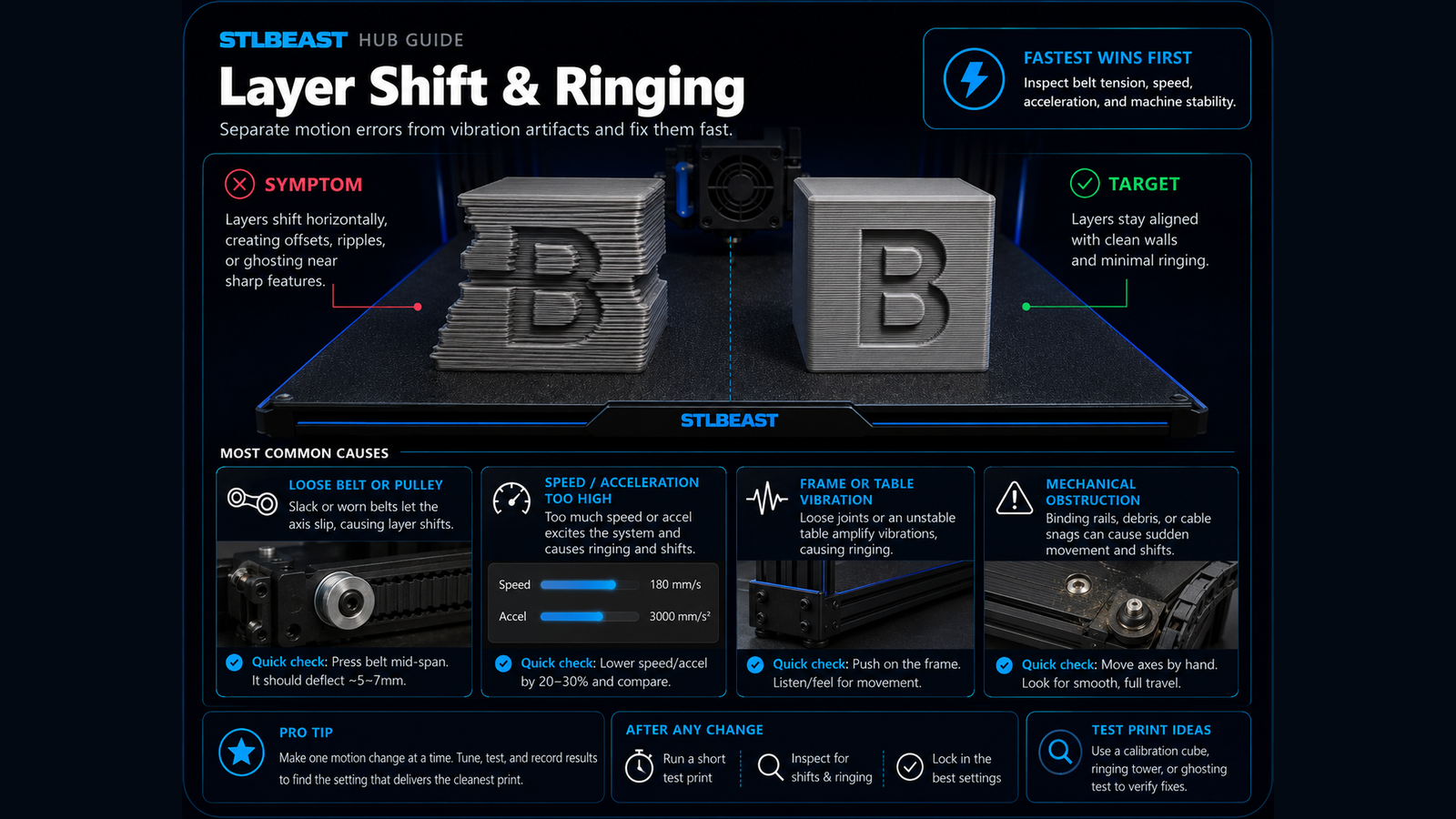
Fix sudden sideways offsets, shifted layers, skipped motion, and prints that move out of alignment.
Replace worn coupler teeth or damaged PTFE, fully seat the tube against the internal stop, install the locking clip, and remove excessive feed resistance.
Set enough idler pressure to feed consistently without crushing, flattening, or grinding the filament, then verify with a measured extrusion test.
Calibrate average extrusion without hiding clogs, incorrect Z offset, or hotend-capacity limits.
Inspect the bed cable, connector, heater, thermistor, power delivery, mounting, and insulation before compensating with higher temperatures.
Clean the plate and screen area, loosen the plate as specified, home against the approved leveling surface, square the plate, tighten evenly, and set zero only.
Fix poor bed adhesion, lifting first layers, loose corners, and prints that detach from the build plate.
Fix corners curling off the bed, base distortion, and large parts shrinking during printing.
A detailed STLBEAST repair guide to design and tune functional threads for the process. Learn how to recognize the symptom, rank the likely causes, apply safe fixes in order, verify the result, and prevent the failure from returning.
Check power input, supply voltage, loose connectors, overheated electronics, shorts, heater wiring, and corrupted files before attempting another long print.
Choose a material rated for UV and service temperature, print for layer strength, protect the surface when appropriate, and test the actual environment before r.
A detailed STLBEAST repair guide to increase motion performance without ringing, shifts, or instability. Learn how to recognize the symptom, rank the likely causes, apply safe fixes in order, verify the result, and prevent the failure from returning.
Inspect probe mounting, deployment, wiring, nozzle cleanliness, bed surface, offsets, and firmware configuration before repeating a homing or mesh cycle.
A detailed STLBEAST repair guide to span gaps with straight strands that do not sag or break. Learn how to recognize the symptom, rank the likely causes, apply safe fixes in order, verify the result, and prevent the failure from returning.
Improve lines printed across gaps, drooping bridge strands, and rough unsupported ceilings.
A detailed STLBEAST repair guide to choose the least intrusive adhesion aid that solves the geometry problem. Learn how to recognize the symptom, rank the likely causes, apply safe fixes in order, verify the result, and prevent the failure from returning.
A detailed STLBEAST repair guide to separate moisture, age, heat, and path stress causes. Learn how to recognize the symptom, rank the likely causes, apply safe fixes in order, verify the result, and prevent the failure from returning.
A detailed STLBEAST repair guide to eliminate trapped bubbles and inconsistent bonding. Learn how to recognize the symptom, rank the likely causes, apply safe fixes in order, verify the result, and prevent the failure from returning.
A detailed STLBEAST repair guide to use a cube to diagnose dimensions, walls, corners, and motion. Learn how to recognize the symptom, rank the likely causes, apply safe fixes in order, verify the result, and prevent the failure from returning.
Members can connect ranked answers to saved printers, previous failed repairs, full Printer Settings, AI Doctor case history and community-confirmed configurations.