Wet Filament Symptoms and Drying
Identify moisture before changing slicer settings, then dry and store filament safely.
- Title matches “filament”
- Keyword match
- Symptom match
Use normal language such as “hairy PETG print,” “clicking extruder and thin lines,” or “resin part stuck to the film.” The engine translates common descriptions into technical causes and explains why each answer matched.
Results are ranked by symptom, title, cause and equipment context.
Identify moisture before changing slicer settings, then dry and store filament safely.
A detailed STLBEAST repair guide to choose the lowest temperature that gives clean flow and strong bonding. Learn how to recognize the symptom, rank the likely causes, apply safe fixes in order, verify the result, and prevent the failure from returning.
A detailed STLBEAST repair guide to protect the nozzle while maintaining luminous surface quality. Learn how to recognize the symptom, rank the likely causes, apply safe fixes in order, verify the result, and prevent the failure from returning.
Tune flexible filament speed, feed path, retraction, temperature, and support behavior.
Trace the complete feed path, remove spool resistance and broken filament, inspect drive rollers and PTFE connections, then test one slot and one filament at a.
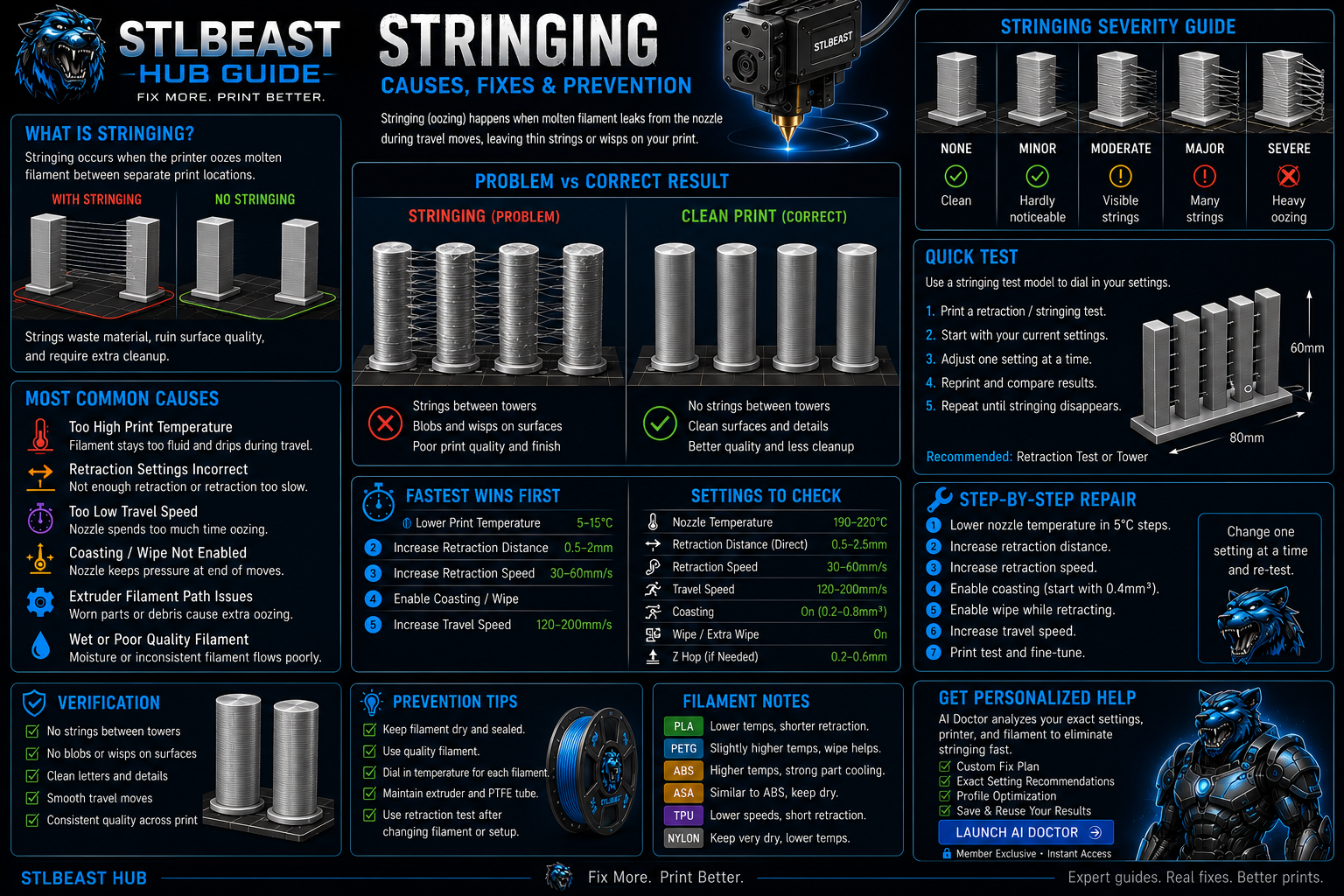
Stop fine hairs, heavy webs, oozing, and travel strings by testing moisture, temperature, retraction, and travel behavior in the right order.
A detailed STLBEAST repair guide to save realistic flow values for each filament rather than one global value. Learn how to recognize the symptom, rank the likely causes, apply safe fixes in order, verify the result, and prevent the failure from returning.
A detailed STLBEAST repair guide to remove texture caused by slicer settings or unstable extrusion. Learn how to recognize the symptom, rank the likely causes, apply safe fixes in order, verify the result, and prevent the failure from returning.
Reduce PETG webs, blobs, wisps, and nozzle buildup without making layers brittle or over-retracting the filament.
Build a reliable PLA baseline for temperature, cooling, speed, retraction, first layer, and strength.
A detailed STLBEAST repair guide to separate moisture, age, heat, and path stress causes. Learn how to recognize the symptom, rank the likely causes, apply safe fixes in order, verify the result, and prevent the failure from returning.
A detailed STLBEAST repair guide to remove fragments and prevent brittle feed failures. Learn how to recognize the symptom, rank the likely causes, apply safe fixes in order, verify the result, and prevent the failure from returning.
A detailed STLBEAST repair guide to use abrasive filled materials without sacrificing flow or hardware. Learn how to recognize the symptom, rank the likely causes, apply safe fixes in order, verify the result, and prevent the failure from returning.
Increase purge only where needed, use suitable transition order, clean the nozzle, and separate heavily contrasting or translucent materials with a tuned purge.
Fix skipped steps, clicking, chewed filament, weak extrusion, and feed interruptions.
A detailed STLBEAST repair guide to measure whether inconsistent stock is causing changing extrusion. Learn how to recognize the symptom, rank the likely causes, apply safe fixes in order, verify the result, and prevent the failure from returning.
A detailed STLBEAST repair guide to restore grip without crushing the filament. Learn how to recognize the symptom, rank the likely causes, apply safe fixes in order, verify the result, and prevent the failure from returning.
Clean and align the sensor path, inspect its connector, confirm filament diameter and flexibility, and adjust debounce or sensitivity only within the manufactur.
A detailed STLBEAST repair guide to store materials according to moisture sensitivity and use frequency. Learn how to recognize the symptom, rank the likely causes, apply safe fixes in order, verify the result, and prevent the failure from returning.
A detailed STLBEAST repair guide to remove the obstruction without damaging fittings or the hotend. Learn how to recognize the symptom, rank the likely causes, apply safe fixes in order, verify the result, and prevent the failure from returning.
A detailed STLBEAST repair guide to restore a clear and aligned filament path. Learn how to recognize the symptom, rank the likely causes, apply safe fixes in order, verify the result, and prevent the failure from returning.
A detailed STLBEAST repair guide to keep TPU/TPE constrained from drive gear to hotend. Learn how to recognize the symptom, rank the likely causes, apply safe fixes in order, verify the result, and prevent the failure from returning.
Stop long prints until the heatsink fan is restored; clean the fan, check its connector and voltage, confirm firmware control, and replace a noisy or stalled un.
A detailed STLBEAST repair guide to remove absorbed moisture without deforming the spool or polymer. Learn how to recognize the symptom, rank the likely causes, apply safe fixes in order, verify the result, and prevent the failure from returning.
Reduce echo lines after corners, ripples around text, and vibration artifacts on outer walls.
A detailed STLBEAST repair guide to preserve shine while maintaining layer bonding and detail. Learn how to recognize the symptom, rank the likely causes, apply safe fixes in order, verify the result, and prevent the failure from returning.
A detailed STLBEAST repair guide to identify changes that occur only after printing for a while. Learn how to recognize the symptom, rank the likely causes, apply safe fixes in order, verify the result, and prevent the failure from returning.
A detailed STLBEAST repair guide to prevent particle jams and tune natural-looking finish. Learn how to recognize the symptom, rank the likely causes, apply safe fixes in order, verify the result, and prevent the failure from returning.
Tune PETG adhesion, stringing, temperature, cooling, flow, and supports for clean strong prints.
A detailed STLBEAST repair guide to reduce contact during travel without masking extrusion faults. Learn how to recognize the symptom, rank the likely causes, apply safe fixes in order, verify the result, and prevent the failure from returning.
A detailed STLBEAST repair guide to increase motion performance without ringing, shifts, or instability. Learn how to recognize the symptom, rank the likely causes, apply safe fixes in order, verify the result, and prevent the failure from returning.
A detailed STLBEAST repair guide to use built-in calibration tools in a sensible order. Learn how to recognize the symptom, rank the likely causes, apply safe fixes in order, verify the result, and prevent the failure from returning.
A detailed STLBEAST repair guide to eliminate trapped bubbles and inconsistent bonding. Learn how to recognize the symptom, rank the likely causes, apply safe fixes in order, verify the result, and prevent the failure from returning.
A detailed STLBEAST repair guide to separate wash residue, water contamination, and over-curing. Learn how to recognize the symptom, rank the likely causes, apply safe fixes in order, verify the result, and prevent the failure from returning.
A detailed STLBEAST repair guide to remove weak transitions, color contamination, and blobs after filament swaps. Learn how to recognize the symptom, rank the likely causes, apply safe fixes in order, verify the result, and prevent the failure from returning.
A detailed STLBEAST repair guide to reduce unnecessary load and heat without losing feed reliability. Learn how to recognize the symptom, rank the likely causes, apply safe fixes in order, verify the result, and prevent the failure from returning.
Set enough idler pressure to feed consistently without crushing, flattening, or grinding the filament, then verify with a measured extrusion test.
A detailed STLBEAST repair guide to remove raised ridges while preserving adhesion. Learn how to recognize the symptom, rank the likely causes, apply safe fixes in order, verify the result, and prevent the failure from returning.
Fix prints that start normally and then lose extrusion, especially with PLA in warm enclosures.
Let the part cool, use the right cutters and direction, remove large branches first, support delicate features, and finish contact marks gradually instead of te.
A detailed STLBEAST repair guide to identify random versus repeating layer variation. Learn how to recognize the symptom, rank the likely causes, apply safe fixes in order, verify the result, and prevent the failure from returning.
A detailed STLBEAST repair guide to reduce ringing after mechanical issues are corrected. Learn how to recognize the symptom, rank the likely causes, apply safe fixes in order, verify the result, and prevent the failure from returning.
A detailed STLBEAST repair guide to control shrinkage across wide flat parts. Learn how to recognize the symptom, rank the likely causes, apply safe fixes in order, verify the result, and prevent the failure from returning.
Align the selector and filament tips, reduce path friction, calibrate sensor positions, clean drive gears, and verify reliable single-filament loading before mu.
Identify enlarged or damaged nozzle openings, soft detail, inconsistent line width, and abrasion damage.
Fix swollen walls, rough top surfaces, seam blobs, and excess plastic without starving the print.
Diagnose inconsistent extrusion, curled purge strands, missing layers, and a nozzle that stops flowing.
Improve the tower’s first layer, width, cooling, speed, and placement, then reduce unnecessary tool changes or use a safer purge strategy.
Members can connect ranked answers to saved printers, previous failed repairs, full Printer Settings, AI Doctor case history and community-confirmed configurations.