ABS and ASA Warping Settings Guide
Tune enclosure, bed adhesion, temperature, cooling, and ventilation for high-shrink materials.
- Title matches “abs”
- Keyword match
- Title matches “asa”
Use normal language such as “hairy PETG print,” “clicking extruder and thin lines,” or “resin part stuck to the film.” The engine translates common descriptions into technical causes and explains why each answer matched.
Results are ranked by symptom, title, cause and equipment context.
Tune enclosure, bed adhesion, temperature, cooling, and ventilation for high-shrink materials.
Fix corners curling off the bed, base distortion, and large parts shrinking during printing.
A detailed STLBEAST repair guide to control moisture, warping, and adhesion for nylon. Learn how to recognize the symptom, rank the likely causes, apply safe fixes in order, verify the result, and prevent the failure from returning.
A detailed STLBEAST repair guide to eliminate trapped bubbles and inconsistent bonding. Learn how to recognize the symptom, rank the likely causes, apply safe fixes in order, verify the result, and prevent the failure from returning.
A detailed STLBEAST repair guide to close visible gaps without crushing the first layer. Learn how to recognize the symptom, rank the likely causes, apply safe fixes in order, verify the result, and prevent the failure from returning.
Clean the plate and screen area, loosen the plate as specified, home against the approved leveling surface, square the plate, tighten evenly, and set zero only.
Fix poor bed adhesion, lifting first layers, loose corners, and prints that detach from the build plate.
A detailed STLBEAST repair guide to remove raised ridges while preserving adhesion. Learn how to recognize the symptom, rank the likely causes, apply safe fixes in order, verify the result, and prevent the failure from returning.
A detailed STLBEAST repair guide to tune the two most important first-layer process settings. Learn how to recognize the symptom, rank the likely causes, apply safe fixes in order, verify the result, and prevent the failure from returning.
Confirm the mesh was saved, the correct profile is loaded after homing, start G-code does not clear it, and the Z axis visibly compensates during the first laye.
A detailed STLBEAST repair guide to calibrate volume only after Z offset and leveling are correct. Learn how to recognize the symptom, rank the likely causes, apply safe fixes in order, verify the result, and prevent the failure from returning.
A detailed STLBEAST repair guide to balance cleanliness, temperature, and release on glass. Learn how to recognize the symptom, rank the likely causes, apply safe fixes in order, verify the result, and prevent the failure from returning.
A detailed STLBEAST repair guide to restore bottom-layer adhesion without excessive exposure. Learn how to recognize the symptom, rank the likely causes, apply safe fixes in order, verify the result, and prevent the failure from returning.
A detailed STLBEAST repair guide to stabilize extrusion and nozzle height across the plate. Learn how to recognize the symptom, rank the likely causes, apply safe fixes in order, verify the result, and prevent the failure from returning.
Fix prints that detach, shift, collapse, or continue extruding loose filament into a tangled spaghetti failure.
A detailed STLBEAST repair guide to remove play that destabilizes layers and first-layer height. Learn how to recognize the symptom, rank the likely causes, apply safe fixes in order, verify the result, and prevent the failure from returning.
Run the printer manufacturer’s PID or heater calibration only after the heater, sensor, wiring, fans, and hotend assembly are confirmed healthy.
A detailed STLBEAST repair guide to control orientation, support, cure, and cross-section changes. Learn how to recognize the symptom, rank the likely causes, apply safe fixes in order, verify the result, and prevent the failure from returning.
Identify an over-squished first layer, scraping nozzle, blocked extrusion, ridges, and elephant-foot symptoms.
A detailed STLBEAST repair guide to set a predictable separation gap based on layer height and material. Learn how to recognize the symptom, rank the likely causes, apply safe fixes in order, verify the result, and prevent the failure from returning.
Build a reliable PLA baseline for temperature, cooling, speed, retraction, first layer, and strength.
Fix horizontal cracks, layers splitting apart, and brittle prints with poor interlayer bonding.
Tune PETG adhesion, stringing, temperature, cooling, flow, and supports for clean strong prints.
A reliable workflow for manual leveling, bed mesh, probe checks, gantry alignment, and first-layer calibration.
Improve the tower’s first layer, width, cooling, speed, and placement, then reduce unnecessary tool changes or use a safer purge strategy.
A detailed STLBEAST repair guide to balance detail, bridging, strength, and warping by material. Learn how to recognize the symptom, rank the likely causes, apply safe fixes in order, verify the result, and prevent the failure from returning.
A detailed STLBEAST repair guide to restore layer bonding and reduce peel stress. Learn how to recognize the symptom, rank the likely causes, apply safe fixes in order, verify the result, and prevent the failure from returning.
A detailed STLBEAST repair guide to reduce peel failures without making prints unnecessarily slow. Learn how to recognize the symptom, rank the likely causes, apply safe fixes in order, verify the result, and prevent the failure from returning.
A detailed STLBEAST repair guide to prevent the nozzle from dragging across finished top layers. Learn how to recognize the symptom, rank the likely causes, apply safe fixes in order, verify the result, and prevent the failure from returning.
A detailed STLBEAST repair guide to use built-in calibration tools in a sensible order. Learn how to recognize the symptom, rank the likely causes, apply safe fixes in order, verify the result, and prevent the failure from returning.
Correct swollen first layers, oversized bottoms, tight holes near the bed, and rounded lower edges.
Fix round, loose first-layer lines, gaps, weak adhesion, and lines that follow the nozzle.
A detailed STLBEAST repair guide to configure support material, interfaces, and organic supports predictably. Learn how to recognize the symptom, rank the likely causes, apply safe fixes in order, verify the result, and prevent the failure from returning.
A detailed STLBEAST repair guide to identify changes that occur only after printing for a while. Learn how to recognize the symptom, rank the likely causes, apply safe fixes in order, verify the result, and prevent the failure from returning.
A detailed STLBEAST repair guide to find intermittent restrictions and feed variation. Learn how to recognize the symptom, rank the likely causes, apply safe fixes in order, verify the result, and prevent the failure from returning.
A detailed STLBEAST repair guide to print high-temperature material within machine limits. Learn how to recognize the symptom, rank the likely causes, apply safe fixes in order, verify the result, and prevent the failure from returning.
Separate removable-sheet, bed, magnet, mounting, and mesh errors; reseat components, remove debris, avoid over-constraining mounts, and replace permanently dist.
Reduce PETG webs, blobs, wisps, and nozzle buildup without making layers brittle or over-retracting the filament.
Clean, dry, sand, and test the part; apply thin compatible primer coats, inspect defects, sand again if needed, then build colour in light layers.
A detailed STLBEAST repair guide to reduce contact during travel without masking extrusion faults. Learn how to recognize the symptom, rank the likely causes, apply safe fixes in order, verify the result, and prevent the failure from returning.
A detailed STLBEAST repair guide to tune normal or tree supports using OrcaSlicer preview and interface controls. Learn how to recognize the symptom, rank the likely causes, apply safe fixes in order, verify the result, and prevent the failure from returning.
Fix holes, infill showing through, weak top skins, rough ridges, and pillowed top surfaces.
Diagnose repeating horizontal bands, wobble, lead-screw artifacts, and periodic surface variation.
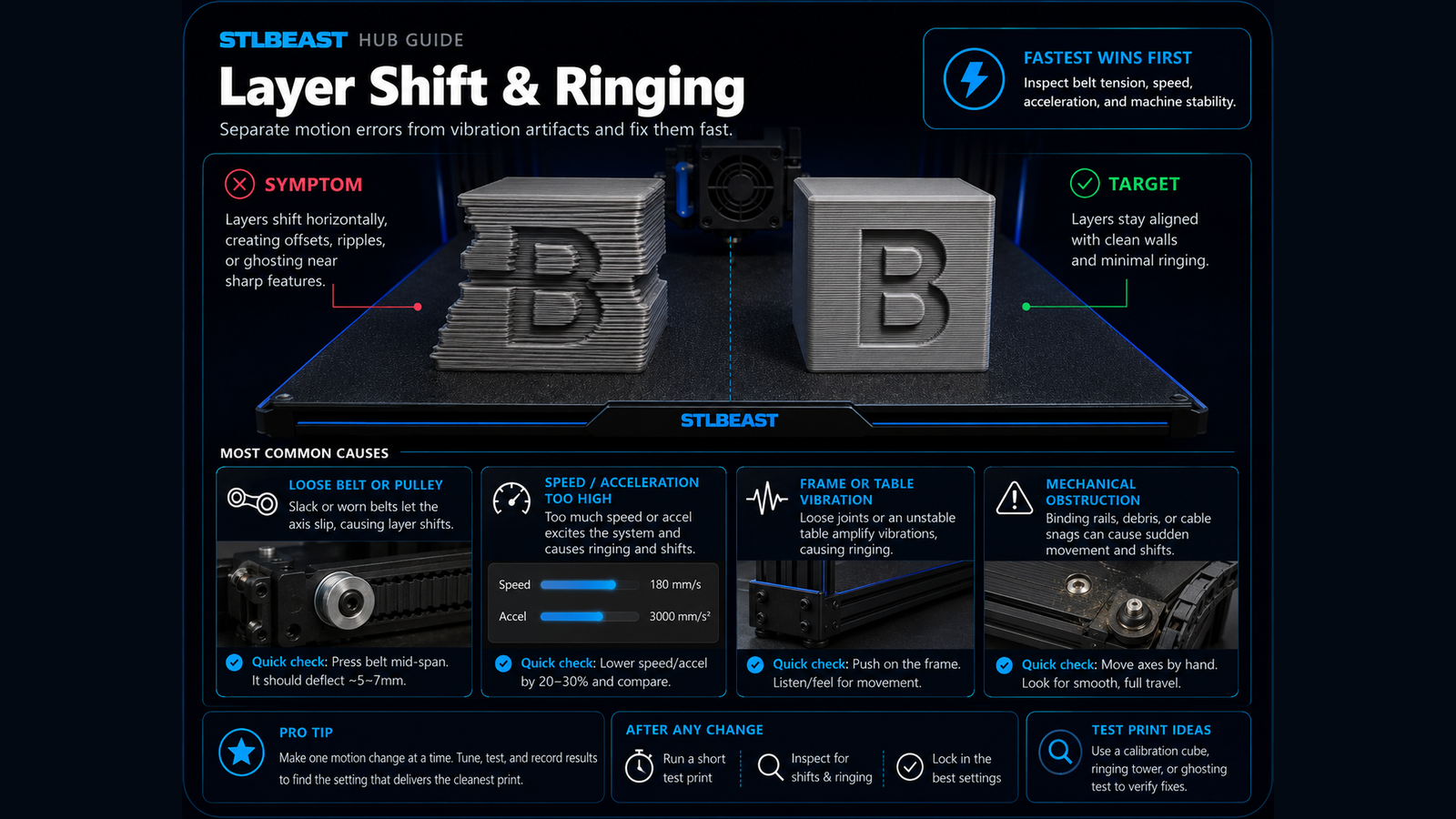
Fix sudden sideways offsets, shifted layers, skipped motion, and prints that move out of alignment.
A detailed STLBEAST repair guide to find the support controls that matter most in Cura. Learn how to recognize the symptom, rank the likely causes, apply safe fixes in order, verify the result, and prevent the failure from returning.
A detailed STLBEAST repair guide to identify random versus repeating layer variation. Learn how to recognize the symptom, rank the likely causes, apply safe fixes in order, verify the result, and prevent the failure from returning.
Choose orientation for strength, supports, surface quality, stability, and fit.
A detailed STLBEAST repair guide to separate harmless travel sounds from real collision risk. Learn how to recognize the symptom, rank the likely causes, apply safe fixes in order, verify the result, and prevent the failure from returning.
Members can connect ranked answers to saved printers, previous failed repairs, full Printer Settings, AI Doctor case history and community-confirmed configurations.