HUB.STLBEAST3D printing knowledge hubFix · learn · print
Hub 8.0 answer engine

Ask what is wrong. Get the strongest repair path.

Use normal language such as “hairy PETG print,” “clicking extruder and thin lines,” or “resin part stuck to the film.” The engine translates common descriptions into technical causes and explains why each answer matched.

Browse visually
Ranked answers

145 possible matches

Results are ranked by symptom, title, cause and equipment context.

Guided matcher
#2 answer98% match

Random Zits and Pockmarks on Walls

A detailed STLBEAST repair guide to separate seam artifacts from moisture, pauses, and pressure errors. Learn how to recognize the symptom, rank the likely causes, apply safe fixes in order, verify the result, and prevent the failure from returning.

Why this matched
  • Title matches “zits”
  • Keyword match
  • Symptom match
Surface QualityModerate12 min
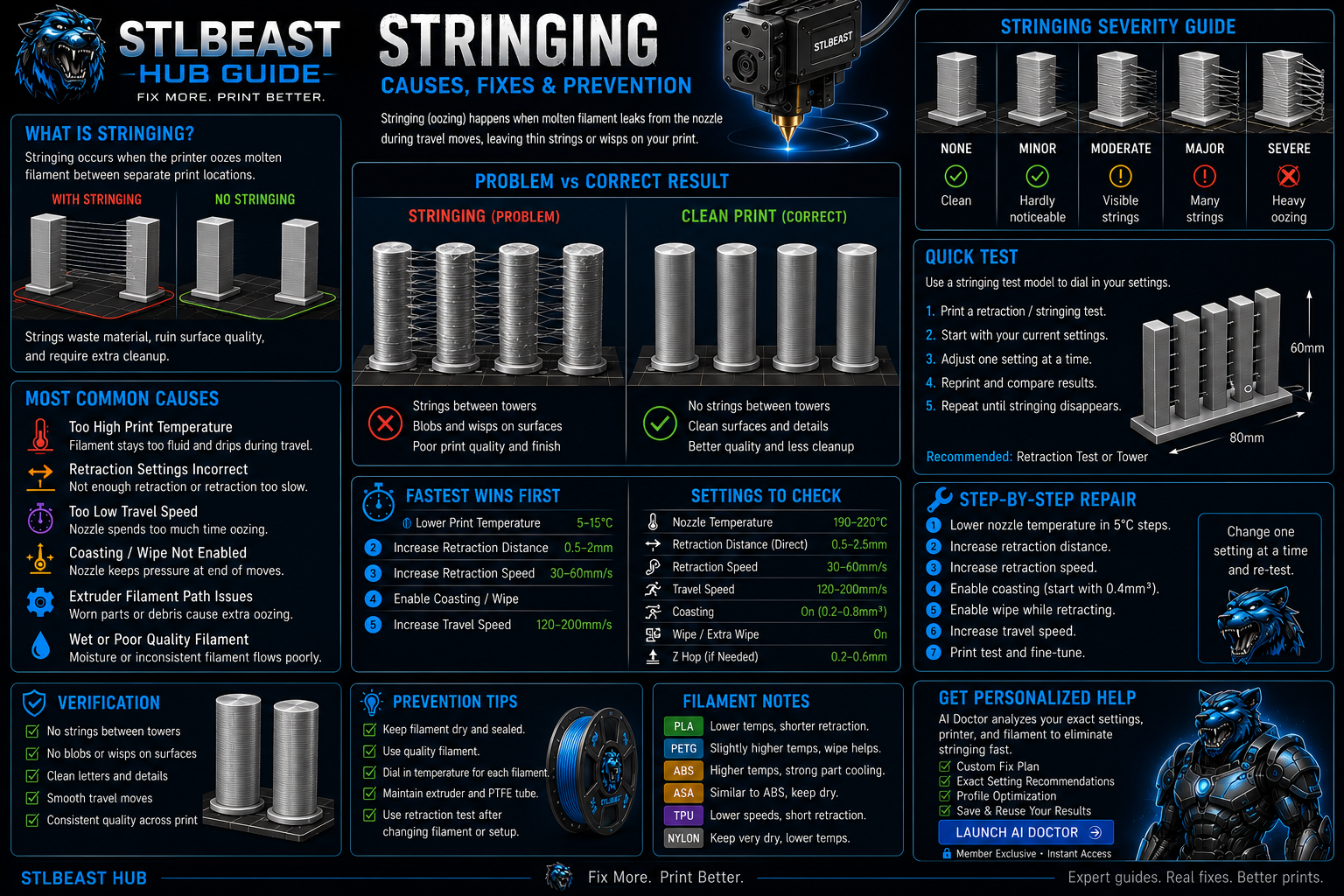
How to Fix Stringing in 3D Prints diagnostic guide
#3 answer98% match

How to Fix Stringing in 3D Prints

Stop fine hairs, heavy webs, oozing, and travel strings by testing moisture, temperature, retraction, and travel behavior in the right order.

Why this matched
  • Likely-cause match
  • Keyword match
  • Direct-answer match
StringingEasy15 min
PETG Stringing Fix diagnostic guide
#4 answer98% match

PETG Stringing Fix

Reduce PETG webs, blobs, wisps, and nozzle buildup without making layers brittle or over-retracting the filament.

Why this matched
  • Keyword match
  • Direct-answer match
  • Likely-cause match
StringingEasy14 min
#5 answer98% match

Z-Seam Placement and Visibility Fix

A detailed STLBEAST repair guide to control where perimeter starts and ends are placed. Learn how to recognize the symptom, rank the likely causes, apply safe fixes in order, verify the result, and prevent the failure from returning.

Why this matched
  • Title matches “seam”
  • Keyword match
  • Symptom match
Surface QualityModerate12 min
#7 answer98% match

First-Layer Ridges and Excess Overlap

A detailed STLBEAST repair guide to remove raised ridges while preserving adhesion. Learn how to recognize the symptom, rank the likely causes, apply safe fixes in order, verify the result, and prevent the failure from returning.

Why this matched
  • Keyword match
  • Symptom match
  • Title matches “over”
First LayerEasy11 min
#8 answer98% match

Nozzle Drag Marks Between Features

A detailed STLBEAST repair guide to reduce contact during travel without masking extrusion faults. Learn how to recognize the symptom, rank the likely causes, apply safe fixes in order, verify the result, and prevent the failure from returning.

Why this matched
  • Keyword match
  • Likely-cause match
Surface QualityModerate12 min
#9 answer98% match

Extrusion Multiplier by Material

A detailed STLBEAST repair guide to save realistic flow values for each filament rather than one global value. Learn how to recognize the symptom, rank the likely causes, apply safe fixes in order, verify the result, and prevent the failure from returning.

Why this matched
  • Keyword match
  • Symptom match
  • Title matches “extrusion”
CalibrationModerate14 min
#10 answer98% match

3D Printed Threads That Fit Reliably

A detailed STLBEAST repair guide to design and tune functional threads for the process. Learn how to recognize the symptom, rank the likely causes, apply safe fixes in order, verify the result, and prevent the failure from returning.

Why this matched
  • Keyword match
  • Likely-cause match
Supports & GeometryModerate14 min
PETG Settings Guide diagnostic guide
#12 answer98% match

PETG Settings Guide

Tune PETG adhesion, stringing, temperature, cooling, flow, and supports for clean strong prints.

Why this matched
  • Likely-cause match
  • Keyword match
  • Direct-answer match
Material SettingsEasy16 min
#13 answer96% match

Retraction Tower Calibration Guide

A detailed STLBEAST repair guide to tune distance and speed without creating heat creep or grinding. Learn how to recognize the symptom, rank the likely causes, apply safe fixes in order, verify the result, and prevent the failure from returning.

Why this matched
  • Title matches “retraction”
  • Keyword match
  • Likely-cause match
CalibrationModerate14 min
Heat Creep Jam Fix diagnostic guide
#14 answer92% match

Heat Creep Jam Fix

Fix prints that start normally and then lose extrusion, especially with PLA in warm enclosures.

Why this matched
  • Direct-answer match
  • Likely-cause match
  • Title matches “fix”
ExtrusionAdvanced16 min
#16 answer92% match

Nozzle Scraping or Hitting the Print

A detailed STLBEAST repair guide to separate harmless travel sounds from real collision risk. Learn how to recognize the symptom, rank the likely causes, apply safe fixes in order, verify the result, and prevent the failure from returning.

Why this matched
  • Keyword match
  • Likely-cause match
ExtrusionModerate13 min
#18 answer92% match

Scratches on Top Surfaces

A detailed STLBEAST repair guide to prevent the nozzle from dragging across finished top layers. Learn how to recognize the symptom, rank the likely causes, apply safe fixes in order, verify the result, and prevent the failure from returning.

Why this matched
  • Keyword match
  • Likely-cause match
Surface QualityModerate12 min
#19 answer91% match

Purge Tower Falling Over or Failing

Improve the tower’s first layer, width, cooling, speed, and placement, then reduce unnecessary tool changes or use a safer purge strategy.

Why this matched
  • Likely-cause match
  • Title matches “over”
  • Keyword match
Multi-MaterialIntermediate13 min
#20 answer90% match

Sudden Under-Extrusion Mid-Print

A detailed STLBEAST repair guide to identify changes that occur only after printing for a while. Learn how to recognize the symptom, rank the likely causes, apply safe fixes in order, verify the result, and prevent the failure from returning.

Why this matched
  • Likely-cause match
  • Title matches “extrusion”
  • Keyword match
ExtrusionModerate13 min
#21 answer88% match

Extruder Motor Overheating

A detailed STLBEAST repair guide to reduce unnecessary load and heat without losing feed reliability. Learn how to recognize the symptom, rank the likely causes, apply safe fixes in order, verify the result, and prevent the failure from returning.

Why this matched
  • Title matches “over”
  • Keyword match
  • Likely-cause match
ExtrusionModerate13 min
#24 answer81% match

Resin Vat Leak: Containment and Recovery

Stop the printer, protect yourself, contain uncured resin, remove the vat without spreading the leak, inspect the film and screen protector, and replace damaged.

Why this matched
  • Likely-cause match
  • Title matches “over”
  • Keyword match
Resin PrintingAdvanced18 min
Elephant Foot Fix diagnostic guide
#26 answer80% match

Elephant Foot Fix

Correct swollen first layers, oversized bottoms, tight holes near the bed, and rounded lower edges.

Why this matched
  • Title matches “fix”
  • Direct-answer match
First LayerEasy11 min
#27 answer80% match

Inconsistent Extrusion During a Print

A detailed STLBEAST repair guide to find intermittent restrictions and feed variation. Learn how to recognize the symptom, rank the likely causes, apply safe fixes in order, verify the result, and prevent the failure from returning.

Why this matched
  • Title matches “extrusion”
  • Keyword match
  • Symptom match
ExtrusionModerate13 min
#29 answer80% match

Poor Small Details and Soft Features

A detailed STLBEAST repair guide to preserve tiny geometry without overheating or motion blur. Learn how to recognize the symptom, rank the likely causes, apply safe fixes in order, verify the result, and prevent the failure from returning.

Why this matched
  • Keyword match
  • Likely-cause match
Surface QualityModerate12 min
#30 answer80% match

Color Change and Purge Problems

A detailed STLBEAST repair guide to remove weak transitions, color contamination, and blobs after filament swaps. Learn how to recognize the symptom, rank the likely causes, apply safe fixes in order, verify the result, and prevent the failure from returning.

Why this matched
  • Likely-cause match
  • Keyword match
Surface QualityModerate12 min
#32 answer78% match

Hotend Temperature Fluctuation

A detailed STLBEAST repair guide to stabilize heater control before tuning print quality. Learn how to recognize the symptom, rank the likely causes, apply safe fixes in order, verify the result, and prevent the failure from returning.

Why this matched
  • Keyword match
  • Symptom match
  • Likely-cause match
ExtrusionModerate13 min
#33 answer76% match

Filament Grinding at the Extruder

A detailed STLBEAST repair guide to restore grip without crushing the filament. Learn how to recognize the symptom, rank the likely causes, apply safe fixes in order, verify the result, and prevent the failure from returning.

Why this matched
  • Keyword match
  • Likely-cause match
ExtrusionModerate13 min
#43 answer72% match

Wall Thickness and Line Width Calibration

A detailed STLBEAST repair guide to verify actual extrusion width using a controlled wall test. Learn how to recognize the symptom, rank the likely causes, apply safe fixes in order, verify the result, and prevent the failure from returning.

Why this matched
  • Keyword match
  • Symptom match
  • Likely-cause match
CalibrationModerate14 min
#44 answer72% match

Watertight 3D Print Leaks

Increase continuous walls and bottom layers, correct under-extrusion and seams, orient to reduce leak paths, and pressure-test safely before using the part.

Why this matched
  • Symptom match
  • Direct-answer match
  • Likely-cause match
Functional PartsIntermediate16 min
#45 answer71% match

Cloudy, Chalky, or White Resin Prints

A detailed STLBEAST repair guide to separate wash residue, water contamination, and over-curing. Learn how to recognize the symptom, rank the likely causes, apply safe fixes in order, verify the result, and prevent the failure from returning.

Why this matched
  • Keyword match
  • Likely-cause match
Resin PrintingModerate14 min
#46 answer71% match

Cold Pull Nozzle Cleaning Guide

A detailed STLBEAST repair guide to remove soft contamination using a controlled pull. Learn how to recognize the symptom, rank the likely causes, apply safe fixes in order, verify the result, and prevent the failure from returning.

Why this matched
  • Keyword match
  • Symptom match
ExtrusionModerate13 min
#47 answer71% match

Filament Diameter Variation and Flow Errors

A detailed STLBEAST repair guide to measure whether inconsistent stock is causing changing extrusion. Learn how to recognize the symptom, rank the likely causes, apply safe fixes in order, verify the result, and prevent the failure from returning.

Why this matched
  • Keyword match
  • Symptom match
MaterialsModerate13 min
#48 answer71% match

First-Layer Flow Calibration

A detailed STLBEAST repair guide to calibrate volume only after Z offset and leveling are correct. Learn how to recognize the symptom, rank the likely causes, apply safe fixes in order, verify the result, and prevent the failure from returning.

Why this matched
  • Keyword match
  • Symptom match
  • Direct-answer match
CalibrationModerate14 min
Member intelligence

Turn one search into a complete printer-specific repair case.

Members can connect ranked answers to saved printers, previous failed repairs, full Printer Settings, AI Doctor case history and community-confirmed configurations.

See member access
Caffeine Monster
Matched next step

Keep the useful workflow going.

Pair practical Hub guidance with Caffeine Monster and the clear three-product Character Collectibles Starter Pack.

STLBEAST ecosystemSolve the print on Hub. Discover the next project in the Store.