HUB.STLBEAST3D printing knowledge hubFix · learn · print
Hub 8.0 answer engine

Ask what is wrong. Get the strongest repair path.

Use normal language such as “hairy PETG print,” “clicking extruder and thin lines,” or “resin part stuck to the film.” The engine translates common descriptions into technical causes and explains why each answer matched.

Browse visually
Ranked answers

164 possible matches

Results are ranked by symptom, title, cause and equipment context.

Guided matcher
#2 answer98% match

3D Prints for Outdoor UV and Heat Exposure

Choose a material rated for UV and service temperature, print for layer strength, protect the surface when appropriate, and test the actual environment before r.

Why this matched
  • Title matches “3d”
  • Keyword match
  • Title matches “prints”
MaterialsIntermediate15 min
#4 answer98% match

Gluing Multi-Part 3D Prints

Dry-fit and align parts first, prepare clean mating surfaces, choose an adhesive compatible with the material and joint load, clamp without distortion, and allo.

Why this matched
  • Title matches “3d”
  • Keyword match
  • Title matches “prints”
Post-ProcessingEasy13 min
#5 answer98% match

Priming and Painting 3D Prints

Clean, dry, sand, and test the part; apply thin compatible primer coats, inspect defects, sand again if needed, then build colour in light layers.

Why this matched
  • Title matches “3d”
  • Keyword match
  • Title matches “prints”
Post-ProcessingEasy15 min
#7 answer96% match

How to Change a 3D Printer Nozzle Safely

A detailed STLBEAST repair guide to replace a nozzle without leaks, thread damage, or wrong Z offset. Learn how to recognize the symptom, rank the likely causes, apply safe fixes in order, verify the result, and prevent the failure from returning.

Why this matched
  • Title matches “3d”
  • Keyword match
  • Direct-answer match
ExtrusionModerate13 min
#8 answer95% match

Heat-Set Inserts for 3D Printed Parts

Design the correct pilot hole and surrounding wall, use a temperature-controlled insertion tool, press straight without force, stop at depth, and let the joint.

Why this matched
  • Title matches “3d”
  • Keyword match
  • Title matches “for”
Functional PartsIntermediate16 min
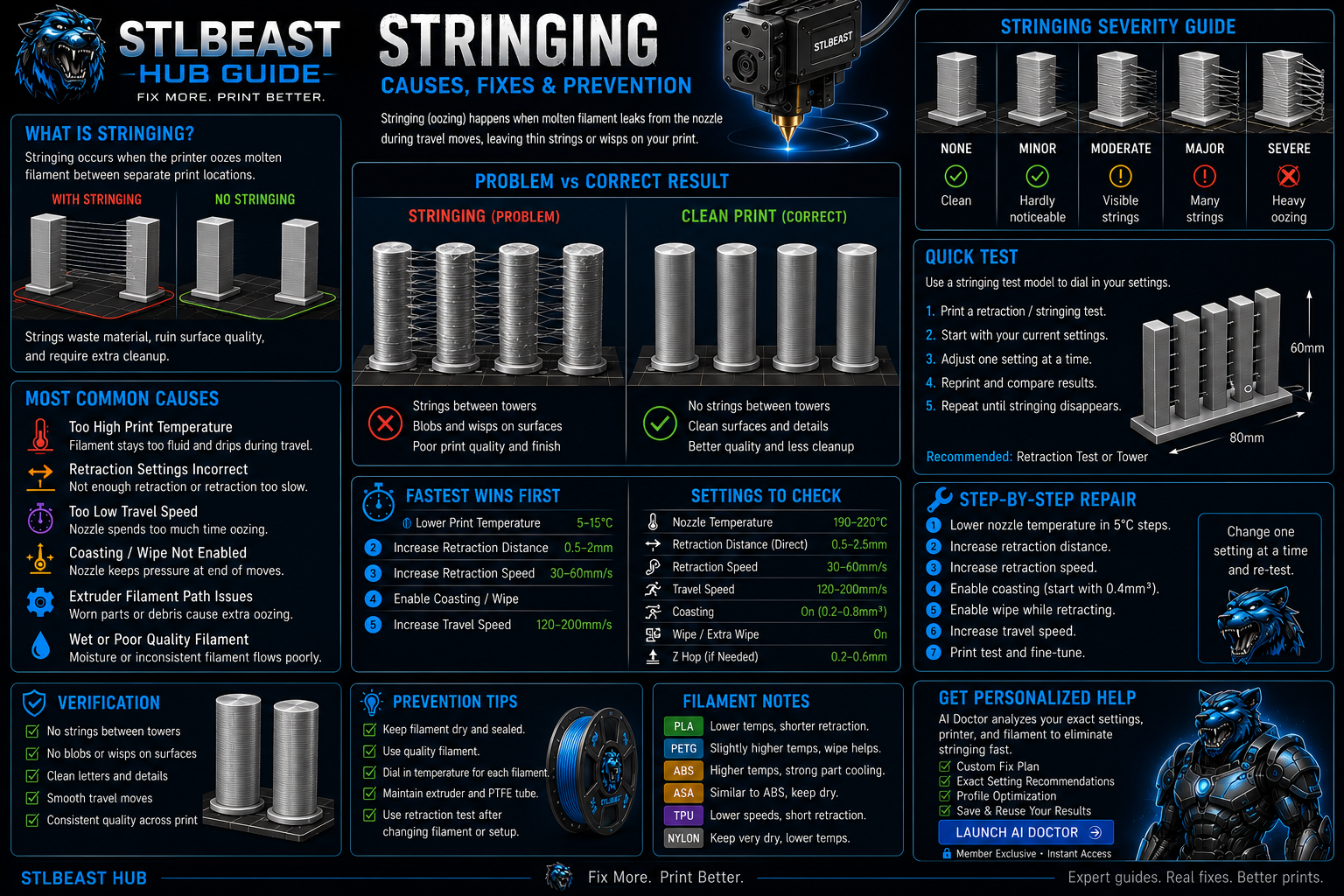
How to Fix Stringing in 3D Prints diagnostic guide
#9 answer95% match

How to Fix Stringing in 3D Prints

Stop fine hairs, heavy webs, oozing, and travel strings by testing moisture, temperature, retraction, and travel behavior in the right order.

Why this matched
  • Title matches “3d”
  • Keyword match
  • Title matches “prints”
StringingEasy15 min
#10 answer95% match

Sanding and Finishing 3D Prints

Start with safe support cleanup, use progressive grits, keep heat and dust controlled, preserve edges, and apply filler or primer only after the surface is clea.

Why this matched
  • Title matches “3d”
  • Keyword match
  • Title matches “prints”
Post-ProcessingEasy14 min
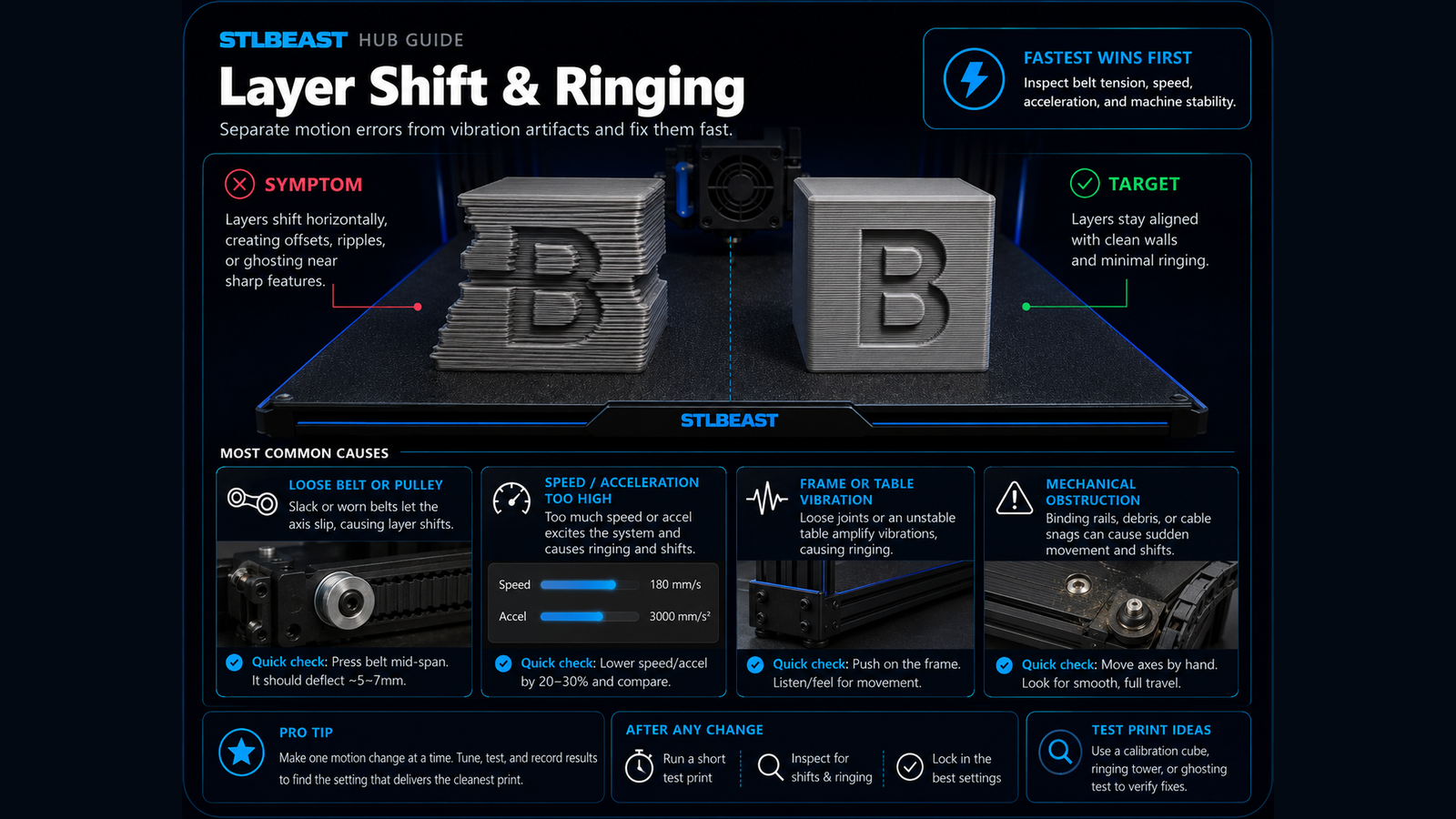
3D Printer Layer Shift diagnostic guide
#11 answer93% match

3D Printer Layer Shift

Fix sudden sideways offsets, shifted layers, skipped motion, and prints that move out of alignment.

Why this matched
  • Title matches “3d”
  • Keyword match
  • Likely-cause match
MotionMedium14 min
#12 answer92% match

How to Split a Large Model for Printing

A detailed STLBEAST repair guide to divide a model into strong, alignable parts that fit the build volume. Learn how to recognize the symptom, rank the likely causes, apply safe fixes in order, verify the result, and prevent the failure from returning.

Why this matched
  • Symptom match
  • Title matches “for”
  • Keyword match
Supports & GeometryModerate14 min
#14 answer85% match

3D Printed Threads That Fit Reliably

A detailed STLBEAST repair guide to design and tune functional threads for the process. Learn how to recognize the symptom, rank the likely causes, apply safe fixes in order, verify the result, and prevent the failure from returning.

Why this matched
  • Title matches “3d”
  • Keyword match
  • Direct-answer match
Supports & GeometryModerate14 min
#15 answer85% match

3D Printer Frame Squareness Check

A detailed STLBEAST repair guide to correct mechanical geometry before calibration. Learn how to recognize the symptom, rank the likely causes, apply safe fixes in order, verify the result, and prevent the failure from returning.

Why this matched
  • Title matches “3d”
  • Keyword match
  • Direct-answer match
Motion & MechanicsModerate12 min
#16 answer85% match

Cloudy, Chalky, or White Resin Prints

A detailed STLBEAST repair guide to separate wash residue, water contamination, and over-curing. Learn how to recognize the symptom, rank the likely causes, apply safe fixes in order, verify the result, and prevent the failure from returning.

Why this matched
  • Title matches “prints”
  • Keyword match
  • Direct-answer match
Resin PrintingModerate14 min
#17 answer85% match

Large Flat Prints: Corners Lifting

A detailed STLBEAST repair guide to control shrinkage across wide flat parts. Learn how to recognize the symptom, rank the likely causes, apply safe fixes in order, verify the result, and prevent the failure from returning.

Why this matched
  • Title matches “prints”
  • Keyword match
  • Direct-answer match
First LayerEasy11 min
#19 answer84% match

Color Change and Purge Problems

A detailed STLBEAST repair guide to remove weak transitions, color contamination, and blobs after filament swaps. Learn how to recognize the symptom, rank the likely causes, apply safe fixes in order, verify the result, and prevent the failure from returning.

Why this matched
  • Keyword match
  • Symptom match
  • Direct-answer match
Surface QualityModerate12 min
#20 answer84% match

Extrusion Multiplier by Material

A detailed STLBEAST repair guide to save realistic flow values for each filament rather than one global value. Learn how to recognize the symptom, rank the likely causes, apply safe fixes in order, verify the result, and prevent the failure from returning.

Why this matched
  • Keyword match
  • Symptom match
  • Direct-answer match
CalibrationModerate14 min
#21 answer84% match

How to Dry Filament Safely

A detailed STLBEAST repair guide to remove absorbed moisture without deforming the spool or polymer. Learn how to recognize the symptom, rank the likely causes, apply safe fixes in order, verify the result, and prevent the failure from returning.

Why this matched
  • Keyword match
  • Symptom match
  • Direct-answer match
MaterialsModerate13 min
#22 answer84% match

Resin Drain Holes and Suction Cups

A detailed STLBEAST repair guide to prevent trapped pressure and uncured resin in hollow models. Learn how to recognize the symptom, rank the likely causes, apply safe fixes in order, verify the result, and prevent the failure from returning.

Why this matched
  • Keyword match
  • Symptom match
  • Direct-answer match
Resin PrintingModerate14 min
#23 answer84% match

Resin Islands and Unsupported Pixels

A detailed STLBEAST repair guide to find every disconnected region before printing. Learn how to recognize the symptom, rank the likely causes, apply safe fixes in order, verify the result, and prevent the failure from returning.

Why this matched
  • Keyword match
  • Direct-answer match
  • Likely-cause match
Resin PrintingModerate14 min
#24 answer84% match

Smooth PEI Adhesion Guide

A detailed STLBEAST repair guide to use smooth PEI safely with the right material and release strategy. Learn how to recognize the symptom, rank the likely causes, apply safe fixes in order, verify the result, and prevent the failure from returning.

Why this matched
  • Keyword match
  • Symptom match
  • Direct-answer match
First LayerEasy11 min
#25 answer82% match

Glass Bed Adhesion Troubleshooting

A detailed STLBEAST repair guide to balance cleanliness, temperature, and release on glass. Learn how to recognize the symptom, rank the likely causes, apply safe fixes in order, verify the result, and prevent the failure from returning.

Why this matched
  • Keyword match
  • Symptom match
  • Direct-answer match
First LayerEasy11 min
#26 answer82% match

Hole Size and Clearance Calibration

A detailed STLBEAST repair guide to create reliable internal dimensions for functional parts. Learn how to recognize the symptom, rank the likely causes, apply safe fixes in order, verify the result, and prevent the failure from returning.

Why this matched
  • Symptom match
  • Keyword match
  • Direct-answer match
CalibrationModerate14 min
#27 answer82% match

Sudden Under-Extrusion Mid-Print

A detailed STLBEAST repair guide to identify changes that occur only after printing for a while. Learn how to recognize the symptom, rank the likely causes, apply safe fixes in order, verify the result, and prevent the failure from returning.

Why this matched
  • Symptom match
  • Keyword match
  • Direct-answer match
ExtrusionModerate13 min
#28 answer80% match

SD Card or G-code Read Error

Use a small, reliable card formatted as the printer expects, export fresh G-code with a short filename, and verify the file completes in the slicer preview.

Why this matched
  • Keyword match
  • Direct-answer match
  • Likely-cause match
Files & ConnectivityEasy11 min
#39 answer77% match

Watertight 3D Print Leaks

Increase continuous walls and bottom layers, correct under-extrusion and seams, orient to reduce leak paths, and pressure-test safely before using the part.

Why this matched
  • Title matches “3d”
  • Keyword match
  • Direct-answer match
Functional PartsIntermediate16 min
#40 answer76% match

PLA+ Settings and Differences from PLA

A detailed STLBEAST repair guide to tune modified PLA blends without assuming every brand behaves the same. Learn how to recognize the symptom, rank the likely causes, apply safe fixes in order, verify the result, and prevent the failure from returning.

Why this matched
  • Keyword match
  • Symptom match
  • Direct-answer match
MaterialsModerate13 min
#41 answer76% match

Resin Lift Speed and Distance Tuning

A detailed STLBEAST repair guide to reduce peel failures without making prints unnecessarily slow. Learn how to recognize the symptom, rank the likely causes, apply safe fixes in order, verify the result, and prevent the failure from returning.

Why this matched
  • Keyword match
  • Direct-answer match
  • Likely-cause match
Resin PrintingModerate14 min
#42 answer76% match

Resin Temperature and Cold-Weather Failures

A detailed STLBEAST repair guide to keep viscosity and cure response within the resin maker range. Learn how to recognize the symptom, rank the likely causes, apply safe fixes in order, verify the result, and prevent the failure from returning.

Why this matched
  • Keyword match
  • Symptom match
  • Direct-answer match
Resin PrintingModerate14 min
#43 answer76% match

Tree Supports vs Normal Supports

A detailed STLBEAST repair guide to choose support geometry based on contact, stability, and cleanup. Learn how to recognize the symptom, rank the likely causes, apply safe fixes in order, verify the result, and prevent the failure from returning.

Why this matched
  • Keyword match
  • Symptom match
  • Direct-answer match
Supports & GeometryModerate14 min
#44 answer72% match

Acceleration Tuning for Speed and Quality

A detailed STLBEAST repair guide to increase motion performance without ringing, shifts, or instability. Learn how to recognize the symptom, rank the likely causes, apply safe fixes in order, verify the result, and prevent the failure from returning.

Why this matched
  • Title matches “for”
  • Keyword match
  • Direct-answer match
CalibrationModerate14 min
#45 answer72% match

Bambu Studio Calibration Workflow

A detailed STLBEAST repair guide to use built-in calibration tools in a sensible order. Learn how to recognize the symptom, rank the likely causes, apply safe fixes in order, verify the result, and prevent the failure from returning.

Why this matched
  • Likely-cause match
  • Keyword match
  • Direct-answer match
Slicer & STL RepairModerate13 min
#46 answer72% match

Input Shaping Basics for Cleaner Corners

A detailed STLBEAST repair guide to reduce ringing after mechanical issues are corrected. Learn how to recognize the symptom, rank the likely causes, apply safe fixes in order, verify the result, and prevent the failure from returning.

Why this matched
  • Title matches “for”
  • Keyword match
  • Direct-answer match
Motion & MechanicsModerate12 min
#47 answer71% match

Auto Bed Leveling Probe Failure

Inspect probe mounting, deployment, wiring, nozzle cleanliness, bed surface, offsets, and firmware configuration before repeating a homing or mesh cycle.

Why this matched
  • Keyword match
  • Direct-answer match
Bed Leveling & ProbesIntermediate15 min
Elephant Foot Fix diagnostic guide
#48 answer71% match

Elephant Foot Fix

Correct swollen first layers, oversized bottoms, tight holes near the bed, and rounded lower edges.

Why this matched
  • Keyword match
  • Direct-answer match
  • Likely-cause match
First LayerEasy11 min
Member intelligence

Turn one search into a complete printer-specific repair case.

Members can connect ranked answers to saved printers, previous failed repairs, full Printer Settings, AI Doctor case history and community-confirmed configurations.

See member access
Caffeine Monster
Matched next step

Keep the useful workflow going.

Pair practical Hub guidance with Caffeine Monster and the clear three-product Character Collectibles Starter Pack.

STLBEAST ecosystemSolve the print on Hub. Discover the next project in the Store.