

#1 answer98% match
Model Orientation for Cleaner Prints
Choose orientation for strength, supports, surface quality, stability, and fit.
Why this matched
- Keyword match
- Title matches “for”
PlanningEasy14 min
Use normal language such as “hairy PETG print,” “clicking extruder and thin lines,” or “resin part stuck to the film.” The engine translates common descriptions into technical causes and explains why each answer matched.
Results are ranked by symptom, title, cause and equipment context.
Choose orientation for strength, supports, surface quality, stability, and fit.
A detailed STLBEAST repair guide to design and tune functional threads for the process. Learn how to recognize the symptom, rank the likely causes, apply safe fixes in order, verify the result, and prevent the failure from returning.
Use a short shielded data cable, disable computer sleep and USB power saving, isolate electrical noise, and prefer local or network printing when the printer su.

Choose realistic speeds for walls, infill, overhangs, bridges, and volumetric flow.
Increase continuous walls and bottom layers, correct under-extrusion and seams, orient to reduce leak paths, and pressure-test safely before using the part.
A detailed STLBEAST repair guide to correct mechanical geometry before calibration. Learn how to recognize the symptom, rank the likely causes, apply safe fixes in order, verify the result, and prevent the failure from returning.
Choose a material rated for UV and service temperature, print for layer strength, protect the surface when appropriate, and test the actual environment before r.
Design the correct pilot hole and surrounding wall, use a temperature-controlled insertion tool, press straight without force, stop at depth, and let the joint.
Check power input, supply voltage, loose connectors, overheated electronics, shorts, heater wiring, and corrupted files before attempting another long print.
Use a small, reliable card formatted as the printer expects, export fresh G-code with a short filename, and verify the file completes in the slicer preview.
Run the printer manufacturer’s PID or heater calibration only after the heater, sensor, wiring, fans, and hotend assembly are confirmed healthy.
A detailed STLBEAST repair guide to replace a nozzle without leaks, thread damage, or wrong Z offset. Learn how to recognize the symptom, rank the likely causes, apply safe fixes in order, verify the result, and prevent the failure from returning.
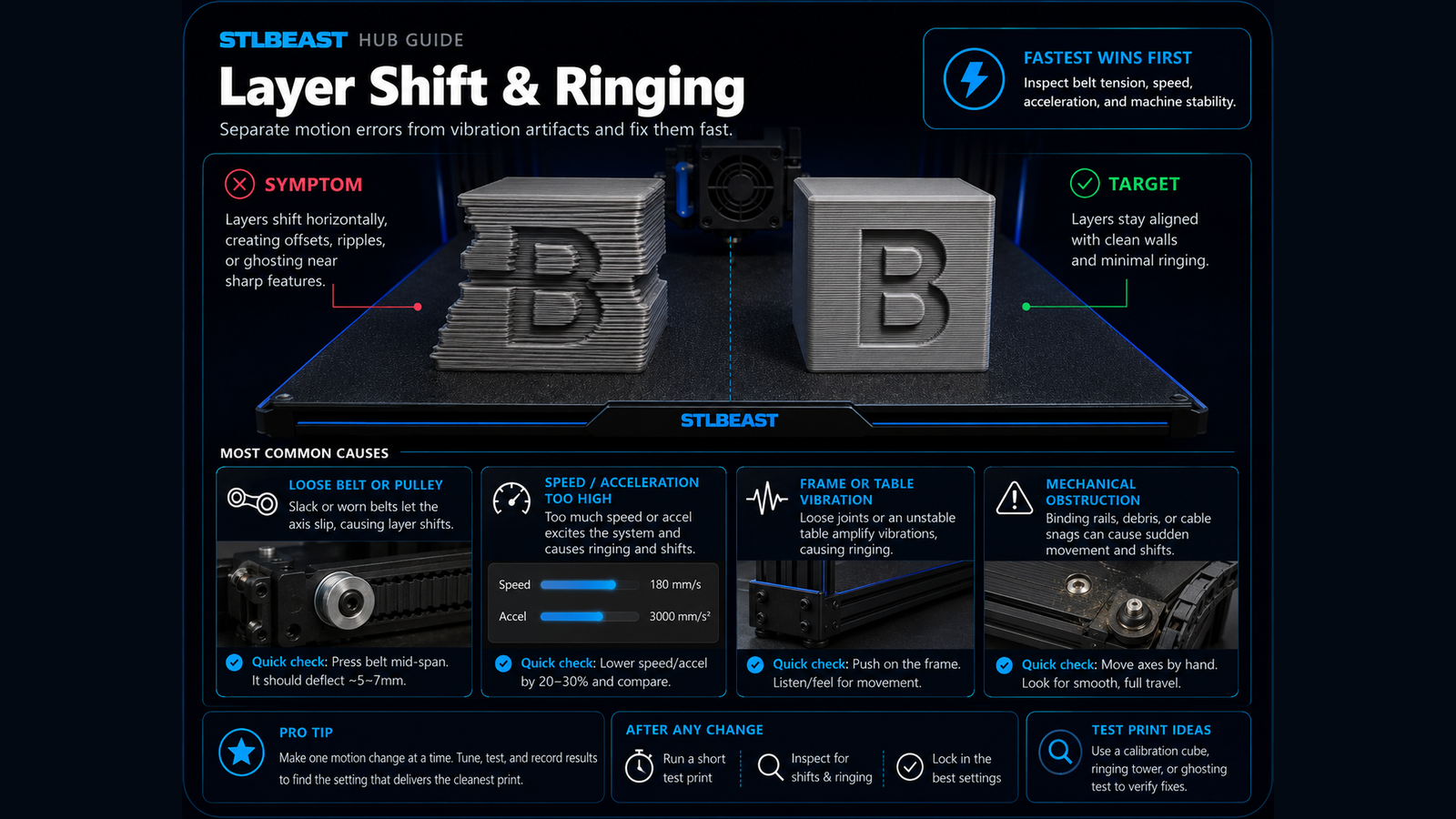
Fix sudden sideways offsets, shifted layers, skipped motion, and prints that move out of alignment.

Fix models that disappear, show missing sections, create empty layers, or look broken in the slicer.

Build a reliable PLA baseline for temperature, cooling, speed, retraction, first layer, and strength.
A detailed STLBEAST repair guide to choose support geometry based on contact, stability, and cleanup. Learn how to recognize the symptom, rank the likely causes, apply safe fixes in order, verify the result, and prevent the failure from returning.
A detailed STLBEAST repair guide to increase motion performance without ringing, shifts, or instability. Learn how to recognize the symptom, rank the likely causes, apply safe fixes in order, verify the result, and prevent the failure from returning.

Repair holes, inverted normals, self-intersections, duplicate shells, and broken mesh topology.

Fix thin walls, missing lines, weak layers, gaps, and inconsistent flow.
A detailed STLBEAST repair guide to divide a model into strong, alignable parts that fit the build volume. Learn how to recognize the symptom, rank the likely causes, apply safe fixes in order, verify the result, and prevent the failure from returning.
A detailed STLBEAST repair guide to reduce ringing after mechanical issues are corrected. Learn how to recognize the symptom, rank the likely causes, apply safe fixes in order, verify the result, and prevent the failure from returning.
Replace worn coupler teeth or damaged PTFE, fully seat the tube against the internal stop, install the locking clip, and remove excessive feed resistance.
Inspect the bed cable, connector, heater, thermistor, power delivery, mounting, and insulation before compensating with higher temperatures.
Clean the plate and screen area, loosen the plate as specified, home against the approved leveling surface, square the plate, tighten evenly, and set zero only.

Fix poor bed adhesion, lifting first layers, loose corners, and prints that detach from the build plate.

Fix corners curling off the bed, base distortion, and large parts shrinking during printing.
Dry-fit and align parts first, prepare clean mating surfaces, choose an adhesive compatible with the material and joint load, clamp without distortion, and allo.
Clean, dry, sand, and test the part; apply thin compatible primer coats, inspect defects, sand again if needed, then build colour in light layers.
Inspect probe mounting, deployment, wiring, nozzle cleanliness, bed surface, offsets, and firmware configuration before repeating a homing or mesh cycle.
Verify the heater cartridge, thermistor reading, connectors, power supply, hotend assembly, and fan airflow before changing slicer temperatures.
A detailed STLBEAST repair guide to stabilize heater control before tuning print quality. Learn how to recognize the symptom, rank the likely causes, apply safe fixes in order, verify the result, and prevent the failure from returning.
Align the selector and filament tips, reduce path friction, calibrate sensor positions, clean drive gears, and verify reliable single-filament loading before mu.
Check slicer fan commands, fan ducts, debris, connector, voltage, and fan direction before increasing cooling percentages.
A detailed STLBEAST repair guide to find exposure that preserves detail while maintaining strength. Learn how to recognize the symptom, rank the likely causes, apply safe fixes in order, verify the result, and prevent the failure from returning.
Stop the printer, protect yourself, contain uncured resin, remove the vat without spreading the leak, inspect the film and screen protector, and replace damaged.
Calibrate printer dimensions, material flex, clearance, layer orientation, and hook geometry using a small test coupon before reprinting the full assembly.

Fix prints that detach, shift, collapse, or continue extruding loose filament into a tangled spaghetti failure.
Power down, remove mechanical load, inspect belts, lead screws, connectors, motor wiring, driver current, and axis binding before commanding more movement.
Stop the machine, disconnect power after it cools, and inspect the heater, thermistor, wiring, connectors, hotend assembly, and firmware limits before attemptin.
A detailed STLBEAST repair guide to control moisture, warping, and adhesion for nylon. Learn how to recognize the symptom, rank the likely causes, apply safe fixes in order, verify the result, and prevent the failure from returning.
A detailed STLBEAST repair guide to use built-in calibration tools in a sensible order. Learn how to recognize the symptom, rank the likely causes, apply safe fixes in order, verify the result, and prevent the failure from returning.
A detailed STLBEAST repair guide to remove weak transitions, color contamination, and blobs after filament swaps. Learn how to recognize the symptom, rank the likely causes, apply safe fixes in order, verify the result, and prevent the failure from returning.
A detailed STLBEAST repair guide to cool tiny layers before the next pass. Learn how to recognize the symptom, rank the likely causes, apply safe fixes in order, verify the result, and prevent the failure from returning.

Correct swollen first layers, oversized bottoms, tight holes near the bed, and rounded lower edges.
A detailed STLBEAST repair guide to save realistic flow values for each filament rather than one global value. Learn how to recognize the symptom, rank the likely causes, apply safe fixes in order, verify the result, and prevent the failure from returning.
A detailed STLBEAST repair guide to restore a clear and aligned filament path. Learn how to recognize the symptom, rank the likely causes, apply safe fixes in order, verify the result, and prevent the failure from returning.
A detailed STLBEAST repair guide to remove raised ridges while preserving adhesion. Learn how to recognize the symptom, rank the likely causes, apply safe fixes in order, verify the result, and prevent the failure from returning.
A detailed STLBEAST repair guide to square the X gantry before compensating in software. Learn how to recognize the symptom, rank the likely causes, apply safe fixes in order, verify the result, and prevent the failure from returning.
Members can connect ranked answers to saved printers, previous failed repairs, full Printer Settings, AI Doctor case history and community-confirmed configurations.

Pair practical Hub guidance with Caffeine Monster and the clear three-product Character Collectibles Starter Pack.